How to Install IPTV on Samsung Smart TV
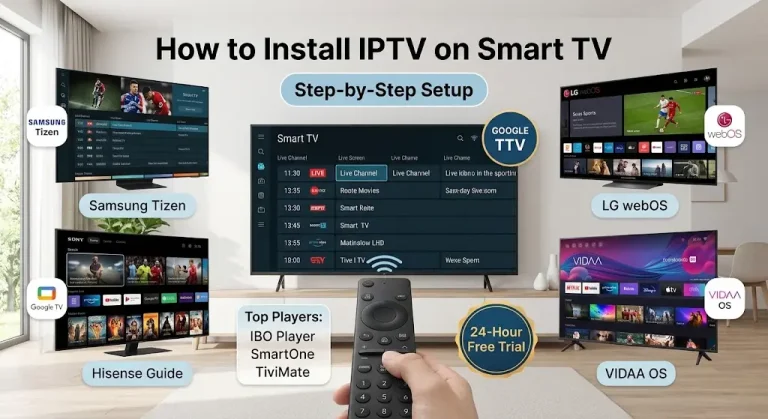
Samsung Smart TVs lead the market in display clarity and hardware performance, making them an exceptional screen for streaming live sports, international broadcasts, and video-on-demand (VOD) libraries. However, because Samsung displays run on Samsung’s proprietary Tizen OS, the installation process differs fundamentally from Android TV or Firestick systems. Tizen OS functions within a closed, sandboxed ecosystem. You cannot directly download APK files through an internet browser or use third-party app stores. Instead, the legitimate and most stable way to stream IPTV on a Samsung TV is to install a certified media player app directly from the built-in Samsung Smart Hub and connect your playlist via an external web management portal. This complete step-by-step tutorial guides you through installing the best Samsung IPTV players, linking your Xtream Codes or M3U credentials, configuring your TV guide, and eliminating stream buffering.
Compatible Samsung Smart TV Models
This installation method works with all modern Samsung TVs running Tizen:
- Samsung Neo QLED and QLED Series: Flagship 8K and 4K models (QN900, QN90, Q80, Q70, Q60 series).
- Samsung OLED TVs: S95, S90, and the latest Quantum Dot OLED TVs.
- Samsung Crystal UHD Series: DU, CU, AU, and TU series (such as CU7000, CU8000, AU8000).
- Samsung Lifestyle Models: The Frame, The Serve, The Cero, and The Terrace.
- Supported Tizen Versions: Tizen 4.0, 5.0, 5.5, 6.5, 7.0, and the latest Tizen 8.0/9.0 versions.
What You Need Before Setup
Before starting the installation, make sure you have the following:
- Samsung Account: Sign in on your TV to download apps from the Samsung Smart Hub app store.
- High-Speed Internet Connection: At least 25 Mbps for streaming Full HD channels at 1080p resolution, and at least 50 Mbps for 4K UHD channels.
- Secondary Device (Phone, Tablet, or Computer): Required to open the player’s web portal and link the playlist.
- Valid IPTV Subscription Credentials: Xtream Codes API: Server URL, username, and password (recommended for faster channel loading and EDI synchronization). M3U Playlist Link: A direct web link provided by the service.
- Samsung-compatible IPTV player: Popular options include IBO Player, IPTV Smarters Pro, Bob Player, and Nanomid Player.
How to Install IPTV on Samsung Smart TV
- Open the Samsung Smart Hub app: Turn on your Samsung Smart TV. Press the Home button on your remote to bring up the main control panel, then select Apps.
- Search for IPTV Smarters Pro: Tap the search icon (magnifying glass) in the top right corner. Type IPTV Smarters Pro (or Smarters Player Lite) using the on-screen keyboard.
- Install the app: Select IPTV Smarters Pro from the search results, tap Install, and wait for the download to complete. Once finished, tap Add to Home Screen for easy access from your main app bar.
- Open the IPTV Smarters app: Tap Open directly from the installation banner or launch it from your main app menu. Read and accept the user agreement to proceed to the login screen.
👉 Start your free 24-hour trial now – get your instant Xtream code details
How to Log In and Fetch Channels on IPTV Smarters Pro:
IPTV Smarters Pro on Samsung TV lets you log in using Xtream Codes or an M3U playlist. Using the Xtream Codes API provides faster loading times and automatic integration with the TV guide:
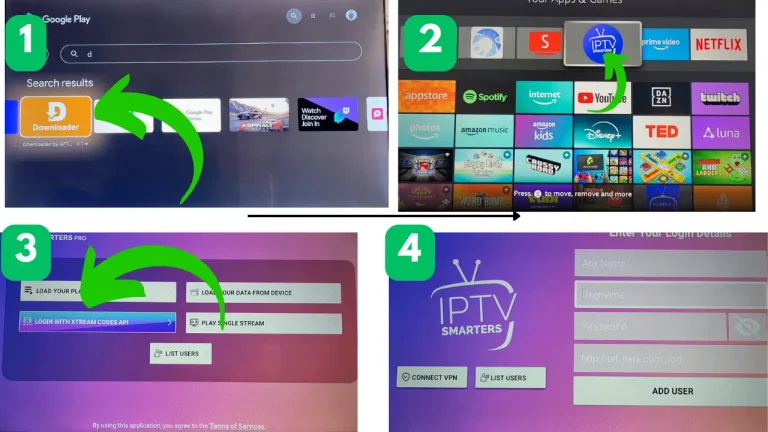
Select Xtream Codes API: On the Smarters welcome screen, click Log in using Xtream Codes API (often labeled Add User) Get Xtream Code 24 hors Free trial.
Enter your subscription credentials:
Type your account details in the four designated fields:
Any Name: Enter a profile nickname (e.g., My IPTV).
Username: Enter the username provided by your IPTV service.
Password: Enter your account password.
Server URL/Port: Enter your server address exactly as it is (http://server-address.com ).
Frequently Asked Questions: Setting Up IPTV on a Samsung Smart TV
IPTV Smarters Pro (Smarters Player Lite) is the best choice for most users, as it allows direct login to the Xtream Codes API without requiring online activation. Other high-performance players designed for Samsung Tizen include IBO Player, SmartOne IPTV, and Smart IPTV (SIPTV).
IPTV Smarters Pro and SS IPTV are among the best free options available for download on the Samsung Smart TV platform. While apps like Smart IPTV or IBO Player charge a one-time activation fee after a 7-day trial period, Smarters provides full access to live TV, video on demand (VOD), and the electronic program guide (EPG) without requiring license purchases.
Yes. Samsung’s Tizen operating system supports many native IPTV media players available directly from the official Samsung app store, including IPTV Smarters Pro, SmartOne IPTV, IBO Player, Nanomid, and Smart IPTV. You don’t need an Android operating system to stream IPTV on Samsung TVs.
Open the Samsung Smart Hub app by pressing the Home button on your remote. Then, go to Apps, tap the search icon (magnifying glass), and type the name of your desired player (such as IPTV Smarters Pro). Tap Install, launch the app, and enter your service credentials.
Press the Home button on your Samsung OneRemote remote and open Apps.
Search for IPTV Smarters Pro (or Smarters Player Lite).
Tap Install and open the app.
Select Sign in with Xtream Codes API, enter your service provider credentials (username, password, and server URL), and then click Add User.
Xtreme HD IPTV is a service provider, not a standalone application.
To run it on your Samsung TV:
Download a compatible Tizen player from the Samsung App Store (such as IPTV Smarters Pro or IBO Player).
Open the player and select Xtreme Codes API.
Enter the server URL, username, and password sent in the Xtreme HD activation email to load your channels.
If the service provides an M3U playlist link instead of Xtream Codes:
Within IPTV Smarters: Select Upload Playlist or File/URL, name the playlist, paste the full M3U URL, and click Add User.
Using Smart IPTV/IBO Player: Note your TV’s MAC address from the app screen, then go to the player’s web upload portal on your phone or computer, paste the M3U link, and click “Submit/Upload.”
Samsung Smart TVs run on the proprietary Tizen operating system, so standard Android APK files cannot be installed from external sources. If the app doesn’t appear, make sure your TV software is up to date, try changing your Samsung account’s country/region, or use an alternative app player approved by the Samsung App Store. Alternatively, you can connect an external streaming device (such as a Firestick 4K or Chromecast with Google TV) to the HDMI port.